"use client";

/* Reconstructed from Susegad UI's own packages/components/field-note/demo.html
   (enquiry form fields, copy and the initial note.check() call), re-expressed
   with React refs/JSX and Tailwind layout. Colours use theme tokens so the
   form reads correctly in both light and dark. */

import * as React from "react";
import FieldNote, { type FieldNoteHandle } from "@/components/ui/field-note";

export default function FieldNoteDemo() {
  const nameNote = React.useRef<FieldNoteHandle>(null);
  const emailNote = React.useRef<FieldNoteHandle>(null);
  const phoneNote = React.useRef<FieldNoteHandle>(null);
  const guestsNote = React.useRef<FieldNoteHandle>(null);
  const termsNote = React.useRef<FieldNoteHandle>(null);
  const notes = [nameNote, emailNote, phoneNote, guestsNote, termsNote];

  React.useEffect(() => {
    // show the notes as they look after a first try at sending
    notes.forEach((n) => n.current?.check());
  }, []);

  const inputCls =
    "max-w-xs rounded border border-input bg-background px-3 py-2 text-[0.95rem] text-foreground outline-none aria-invalid:border-rose-600 dark:aria-invalid:border-rose-400";

  return (
    <main className="mx-auto w-full max-w-xl bg-background px-4 py-10 text-foreground">
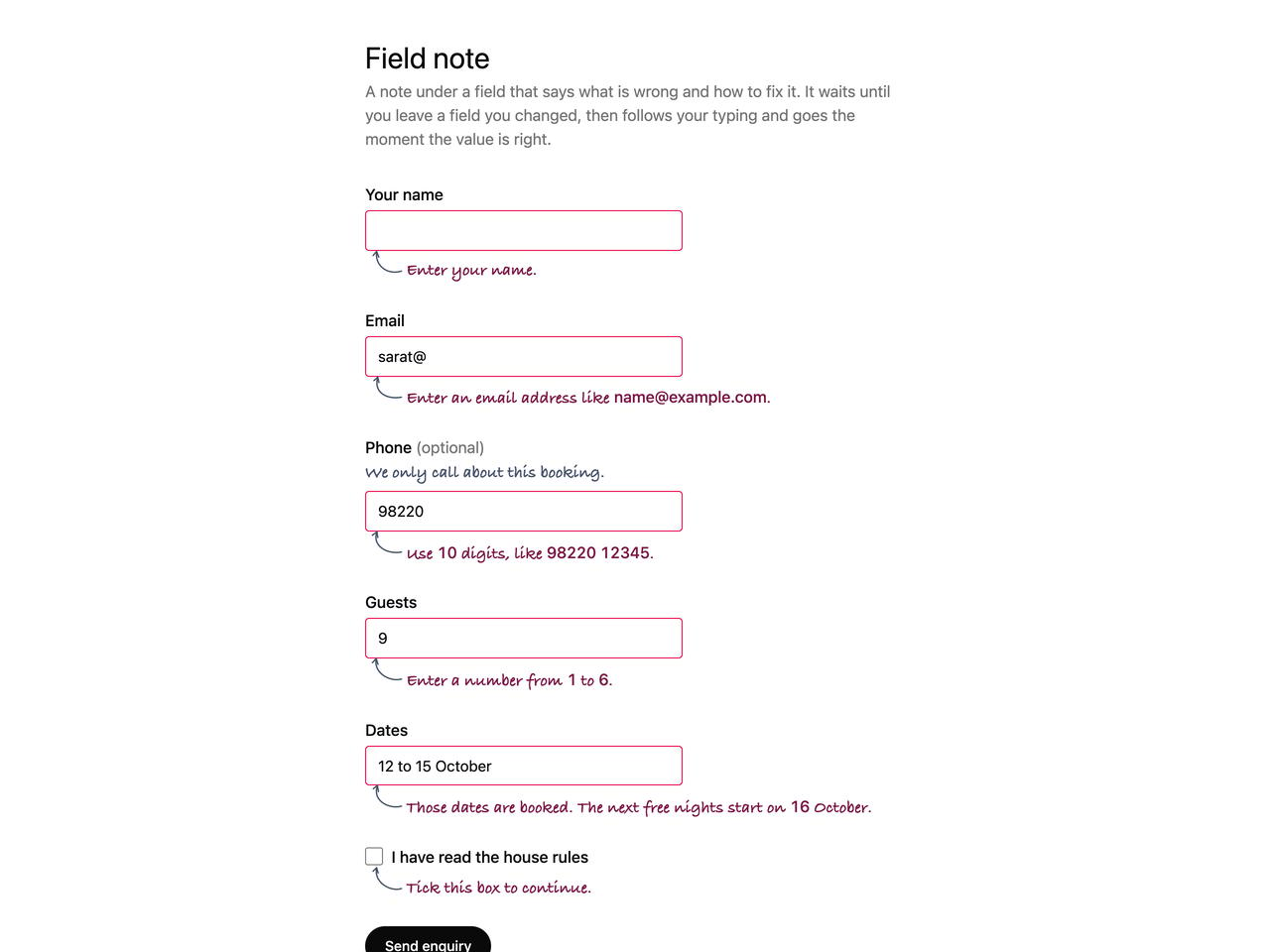
      <h1 className="mb-1 text-3xl text-foreground">Field note</h1>
      <p className="mb-8 text-muted-foreground">
        A note under a field that says what is wrong and how to fix it. It waits
        until you leave a field you changed, then follows your typing and goes
        the moment the value is right.
      </p>

      <form
        className="grid gap-6"
        noValidate
        onSubmit={(e) => {
          e.preventDefault();
          notes.forEach((n) => n.current?.check());
        }}
      >
        <div className="grid gap-1">
          <label htmlFor="name" className="font-medium text-foreground">
            Your name
          </label>
          <input
            id="name"
            name="name"
            required
            autoComplete="name"
            className={inputCls}
          />
          <FieldNote ref={nameNote} htmlFor="name" validate />
        </div>

        <div className="grid gap-1">
          <label htmlFor="email" className="font-medium text-foreground">
            Email
          </label>
          <input
            id="email"
            name="email"
            type="email"
            required
            autoComplete="email"
            defaultValue="sarat@"
            className={inputCls}
          />
          <FieldNote ref={emailNote} htmlFor="email" validate />
        </div>

        <div className="grid gap-1">
          <label htmlFor="phone" className="font-medium text-foreground">
            Phone{" "}
            <span className="font-normal text-muted-foreground">
              (optional)
            </span>
          </label>
          <FieldNote id="phone-hint" htmlFor="phone" tone="hint">
            We only call about this booking.
          </FieldNote>
          <input
            id="phone"
            name="phone"
            inputMode="tel"
            pattern="[0-9 ]{10,12}"
            defaultValue="98220"
            className={inputCls}
          />
          <FieldNote
            ref={phoneNote}
            htmlFor="phone"
            validate
            messages={{ patternMismatch: "Use 10 digits, like 98220 12345." }}
          />
        </div>

        <div className="grid gap-1">
          <label htmlFor="guests" className="font-medium text-foreground">
            Guests
          </label>
          <input
            id="guests"
            name="guests"
            type="number"
            min={1}
            max={6}
            step={1}
            defaultValue={9}
            className={inputCls}
          />
          <FieldNote ref={guestsNote} htmlFor="guests" validate />
        </div>

        <div className="grid gap-1">
          <label htmlFor="dates" className="font-medium text-foreground">
            Dates
          </label>
          <input
            id="dates"
            name="dates"
            defaultValue="12 to 15 October"
            className={inputCls}
          />
          {/* rendered by the server after it checked the calendar */}
          <FieldNote htmlFor="dates">
            Those dates are booked. The next free nights start on 16 October.
          </FieldNote>
        </div>

        <div className="grid gap-1">
          <div className="flex items-center gap-2">
            <input
              id="terms"
              name="terms"
              type="checkbox"
              required
              className="h-[1.15rem] w-[1.15rem] rounded border-input bg-background accent-foreground"
            />
            <label htmlFor="terms" className="font-medium text-foreground">
              I have read the house rules
            </label>
          </div>
          <FieldNote ref={termsNote} htmlFor="terms" validate />
        </div>

        <button
          type="submit"
          className="justify-self-start rounded-full bg-foreground px-5 py-2.5 text-sm font-medium text-background"
        >
          Send enquiry
        </button>
      </form>
    </main>
  );
}